
Packet Tracer lab download facts
- Official source
- Cisco Resource Hub
- Sign-in
- Cisco requires sign-in to download resources.
- PKT
- A saved Packet Tracer network topology.
- PKA
- A course activity with possible checks or scoring.
- PKZ
- A package that can bundle files and resources.
- Compatibility
- Follow Cisco's or the course's release notes.
Where to find a Cisco Packet Tracer labs download
Start at Cisco Networking Academy's Resource Hub. Its public page says users must log in to download resources. Check each item title and course context before choosing a file.
Some activities require course access. Check the lesson or ask your instructor. For self-study, use a public Cisco handout and build a topology when no activity file is offered.
Cisco and each course owner control access; this page links to the official hub, not guessed file URLs.
PKT, PKA, and PKZ files at a glance
Check the extension first. Cisco distinguishes saved networks, course activities, and packages with embedded resources. The course page remains the authority for instructions and permitted use.
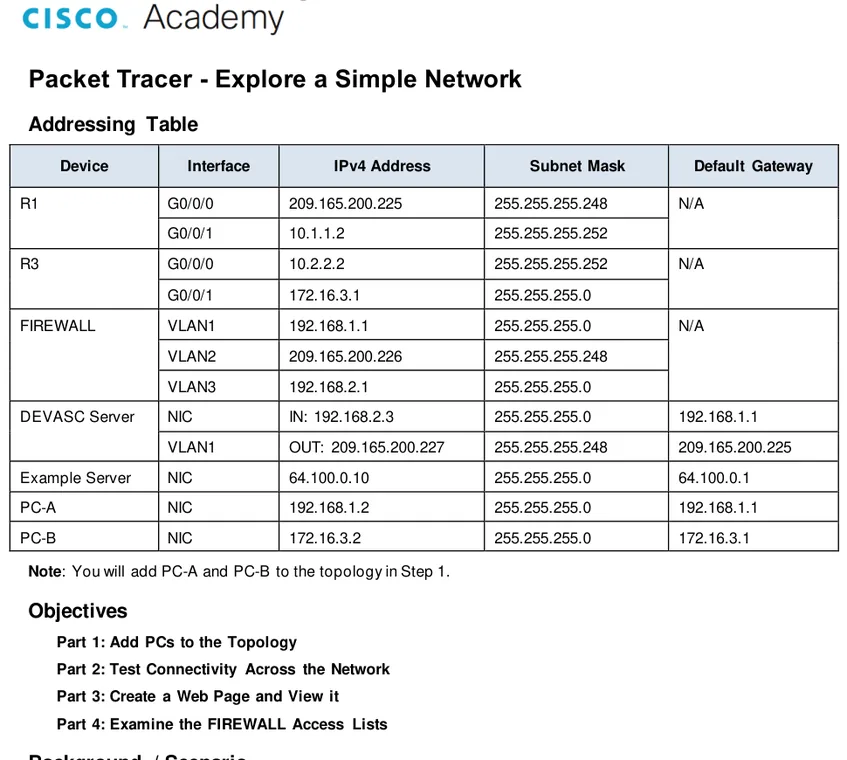
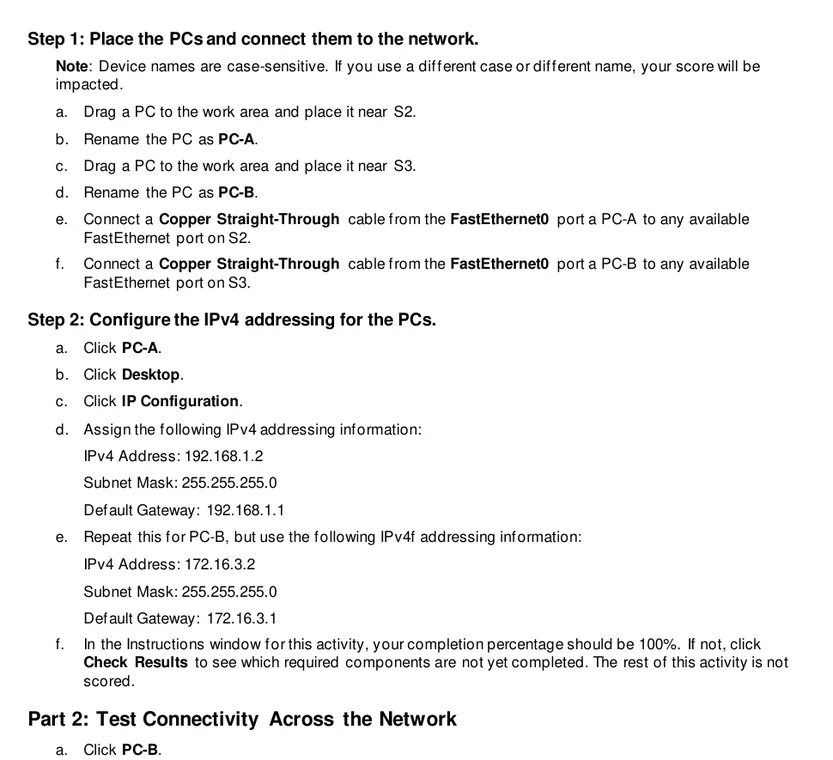
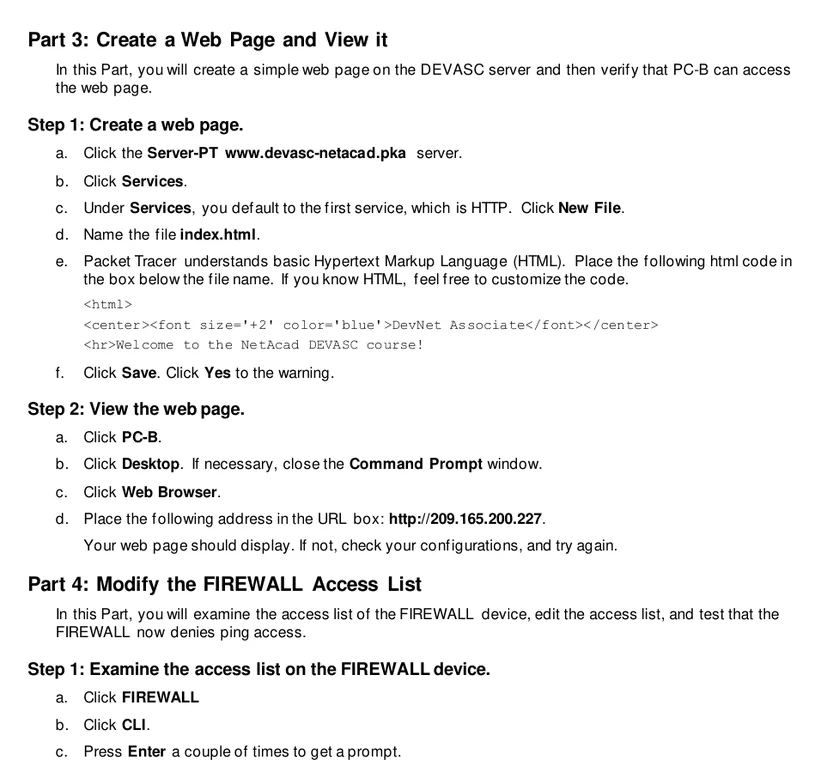
A PDF explains the goal, topology, addressing, and checks; a PKT or PKA contains simulation data. Some lessons publish a handout without a companion activity file.
| File type | Typical role | What to check |
|---|---|---|
| PKT | A saved Packet Tracer network. | Check the lesson goal and compatible release. |
| PKA | An activity with directions or completion checks. | Follow the source; do not bypass assessment logic. |
| PKZ | A package with a network file or resources. | Keep it intact and follow source instructions. |
| A lab brief or worksheet. | It is instructions, not an interactive topology. |
Download a legitimate Packet Tracer lab file step by step
Match the activity title to your course before saving it.
- 1
Open Cisco's hub
Visit netacad.com/resources/lab-downloads; check the hostname.
- 2
Sign in
Use an authorized Cisco or institution account.
- 3
Find the activity
Match its title and objective to your lesson.
- 4
Check the type
Identify PDF, PKT, PKA, or PKZ; read compatibility notes.
- 5
Keep the original
Retain its filename. Ask the instructor about missing files.
Cisco's installation guide also points to the Resource Hub; no stable direct URL was verified for every lab.
Open a downloaded file and check compatibility
Match the filename and extension to the course. Avoid unexpected double extensions such as `.pkt.exe`; preserve the original and edit a copy.
Open it in Packet Tracer obtained through Cisco's official path. A PKT is a topology; a PKA may include exercise checks or locked elements.
If it fails, check the download and course compatibility notes. Request a clean copy; never rename an unknown file or install an unverified package.
Troubleshoot the symptom before replacing the file. Restart Packet Tracer, confirm the course's expected release, and open a fresh copy. If the topology loads but activity checks are absent, confirm the source supplied a PKA rather than a PKT; the formats are not interchangeable. Note the exact error and course title when contacting support. Do not convert, rename, or edit a graded activity to force it to load.
What to do when the activity is not listed
A file may require sign-in, course enrollment, or instructor permission. Check lesson details and announcements first.
When only a handout is available, ask whether to build the topology yourself. Public labs may provide objectives without a PKA.
For practice, follow Cisco's Explore a Simple Network handout and save your own topology as a PKT.
Cisco Packet Tracer labs download FAQ
Where can I download Cisco Packet Tracer labs?
Start at Cisco's Resource Hub or the course page. The public hub asks users to log in.
Does every lab have a direct PKT link?
No stable public link was verified for every activity. Use Cisco's page instead of guessing a URL or using a mirror.
What is the difference between PKT and PKA?
PKT is a saved network topology. PKA is a course activity that may include instructions, checks, scoring, or locked elements.
Can I access every lab without signing in?
No. The Resource Hub asks users to log in; course files may need more access.
Why will a lab file not open?
Check the completed download, extension, and course compatibility notes. Ask the source for a clean copy if it still fails.
Should I use a third-party lab mirror?
A listing cannot confirm permission, integrity, or compatibility. Prefer Cisco and course links.
Official Cisco references
- Cisco Networking Academy Resource Hub
Official resource page; the public page says users must log in to download resources.
- Cisco: Packet Tracer File Types
Cisco walkthrough explaining PKT, PKA, and PKZ file behavior.
- Cisco Packet Tracer Download and Installation Instructions
Official application download and installation guide; it directs users to the Resource Hub.
- Cisco: Explore a Simple Network lab handout
Public Cisco lab handout referenced by the example figures on this page.